

Stop Carrying the Family Calendar in Your Head: How AI Turns a Voice Dump Into a Real Plan
Maybe you’re driving right now. Or waiting outside a dance class, folding laundry, sitting in an Uber, or pushing a cart through the grocery store — and the thoughts just keep stacking up.
Piano is every Tuesday. Swimming is every other Wednesday. Baseball is Friday and Saturday. Grandma wants us in San Diego on July 3. We’re supposed to see fireworks on the 4th. The dog needs her shots. The car needs an oil change before the San Francisco trip. The library books are due. I need groceries. I need to work. I need ten minutes that belong to nobody but me.
That’s not poor planning. That’s what the mental load actually sounds like before anyone’s had a chance to organize it.
The real opportunity with AI isn’t asking it to drop appointments onto a calendar one at a time. It’s being able to say all of that out loud, in the same scattered order it’s already arriving in your head, and letting AI sort through it for you. You shouldn’t have to organize your life before you’re allowed to ask for help with it.
The Mess in Your Head Is Still Useful Information
A lot of people assume they need a tidy, perfectly-ordered prompt before AI can do anything useful. Dates already sorted. Locations confirmed. Categories assigned.
That assumption throws away the most useful part of the tool.
You can open voice-to-text and just talk:
“Swimming starts July 1 and happens every other Wednesday from ten to noon. Piano is Tuesday at four. Ballet is every other Thursday, but I need to check which Thursday it starts. Baseball is Friday and Saturday, four to seven, in Woodland Hills. We’re going to San Diego on July 3, but that might run into baseball. Then San Francisco from the 11th through the 15th. The pets need their shots on the 20th. I also need the car serviced, library books returned, and one afternoon to myself.”
That’s supposed to sound messy. It’s a voice dump, not a memo.
AI can take that and start finding the structure inside it — separating fixed appointments from recurring ones, travel from errands, prep work from personal time, and what’s confirmed from what’s still a question mark. You provide the reality. AI just makes that reality visible.
A Calendar Should Show More Than the Official Start Time
Most calendars only record the appointment itself.
Ballet might show up as 6:00–7:00 p.m. on paper. In real life, it starts around 4:45, the moment your kid needs to change clothes, grab their shoes, and get out the door on time. Then there’s the drive, the parking, the waiting through the lesson, and the drive back.
A one-hour class can quietly eat three hours of your evening.
The same goes for sports, vet visits, doctor’s appointments, and holidays. A commitment doesn’t start at its official time — it starts the moment your family has to begin getting ready for it.
A useful AI-built calendar accounts for the prep, the drive, the parking, the waiting, the event, and the trip home — plus room for dinner, unpacking, or just catching your breath afterward. That’s the moment a calendar stops just showing where you’re supposed to be and starts showing what it will actually take to get everyone there.
AI Can Calculate “Every Other Wednesday” — But It Needs a Starting Point
“Every other Thursday” is a completely normal way to describe a family schedule. It’s also incomplete information from a scheduling standpoint — AI needs to know the first date in the sequence before it can calculate the rest.
If swimming starts Wednesday, July 1, and runs every other week, the July dates are July 1, 15, and 29. Easy, once there’s an anchor.
But if you can’t remember whether ballet starts July 2 or July 9, AI shouldn’t just guess and move on. It should flag that date as unconfirmed and ask you. A good assistant organizes what you know — it doesn’t quietly invent what you don’t.
AI Should Flag the Problem Before You Run Into It
A basic digital calendar will let two impossible events sit on the same day without blinking. AI can do better than that.
Before it hands you a finished calendar, it can surface the hard conflicts, the maybes, the missing details, and the days that need more travel or prep time than you’ve probably accounted for.
AI’s job isn’t to decide which commitment wins. That’s still your call — maybe you skip baseball for the family visit, maybe you move the visit instead. AI’s job is just to say, clearly: these two things don’t fit as currently scheduled. You take it from there.
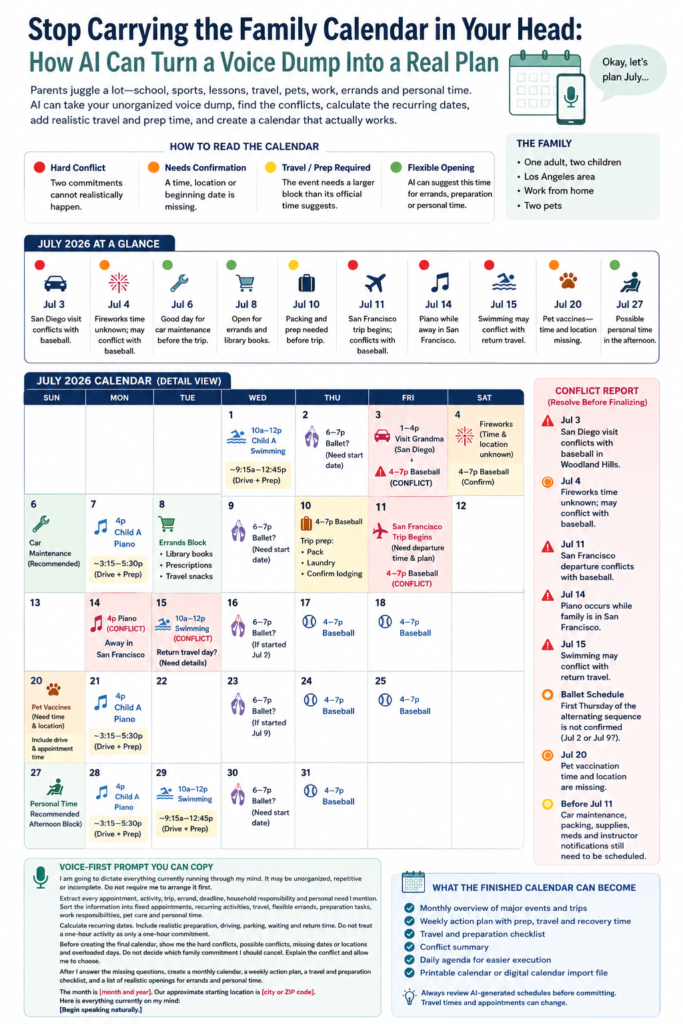
How to Read the Calendar
🔴 Hard conflict — two commitments can’t realistically both happen as scheduled 🟠 Needs confirmation — a time, location, or start date is still missing 🟡 Travel / prep required — the event needs a bigger block than its listed hours suggest 🟢 Flexible opening — a good window for errands, prep, or time to yourself
A Sample Month: One Parent, Two Kids, July 2026
Here’s what it looks like once a real voice dump gets sorted.
One adult, two kids. Child A has piano every Tuesday at 4:00, swimming every other Wednesday from 10–12 starting July 1, and ballet every other Thursday from 6–7 — though the first Thursday hasn’t been confirmed. Child B has baseball Friday and Saturday, 4–7, in Woodland Hills.
The family is visiting Grandma in San Diego on July 3 from 1–4 p.m., hoping to catch fireworks on the 4th, and heading to San Francisco to see Grandpa from July 11–15. The pets are due for vaccinations on the 20th, time still unknown. On top of all of it: working from home, library books, car maintenance, travel supplies, errands, and at least one afternoon that belongs to no one but the parent.
Here’s how that month actually lays out once AI sorts it:

A few things jump out immediately:
- 🔴 July 3, 11, 14, and 15 are hard conflicts — San Diego runs into baseball, the San Francisco trip starts the same day as a baseball game, piano falls while the family is out of town, and swimming lands on what might be the return-trip day.
- 🟠 Every Thursday in the grid is flagged, because the ballet start date was never pinned down — once it’s confirmed, half those flags disappear instantly.
- 🟠 July 4 and July 20 need a missing time or location before they can be finalized.
- 🟢 July 6, 8, and 27 are genuinely open — good candidates for car maintenance, errands, or protected time.
That’s the whole value of the exercise: nothing here required guessing. It just required organizing what was already true.
Week One: July 1–5
Swimming on Wednesday the 1st runs 10–12 on paper, but the realistic block — prep, drive, the class, and the trip home — is closer to 9:15 to 12:45.
Thursday the 2nd might be the first ballet class, but it’s flagged until the alternating schedule is confirmed.
Friday the 3rd is the month’s first hard stop: the San Diego visit ends at 4:00, the exact moment baseball starts in Woodland Hills — with zero allowance for loading kids into the car, holiday traffic, or the drive itself. Something has to move: shorten the visit, skip baseball, or pick a different day.
Saturday the 4th has baseball locked in, but the fireworks plan is still a question mark — what time, where, and whether there’s time to eat and change in between. Until that’s answered, the day stays open.
Week Two: July 6–12
Monday the 6th is a good window for car maintenance, days ahead of the San Francisco trip instead of the night before it.
Tuesday is piano, same as always — but the calendar should hold the time around the lesson, not just the lesson itself.
Wednesday the 8th has nothing fixed, which makes it a solid candidate for library books, prescriptions, or travel supplies — flexible, not mandatory, since work might claim it instead.
Thursday the 9th is the other possible ballet date.
Friday the 10th is tight: baseball from 4–7, with the San Francisco trip starting the next morning. Packing, laundry, lodging confirmation, and travel supplies need to happen before this day, not after it.
Saturday the 11th is the second hard conflict: the trip starts the same day as baseball, and the calendar can’t resolve it without knowing the actual departure time.
Week Three: July 13–19
Tuesday the 14th — piano’s on the regular schedule, but the family’s still in San Francisco. That lesson needs to be canceled, rescheduled, or moved virtual.
Wednesday the 15th is the trickiest flag in the whole month: swimming is scheduled because it’s the second Wednesday in the rotation, but the 15th is also the last day of the San Francisco trip. “Through July 15” doesn’t actually say whether the family’s home by then, driving home that day, or still in San Francisco that evening — so swimming stays flagged until the return plan is nailed down.
Thursday the 16th is the next possible ballet date, if the cycle started on the 2nd.
The days right after a trip — even with baseball back on the calendar Friday and Saturday — deserve room for unpacking, laundry, and recovery. That almost never makes it onto a printed calendar, but it still takes real time.
Week Four: July 20–26
Monday the 20th has the vet appointment, but no time or location yet — and a few more questions worth asking: how many pets are going, are carriers needed, are the kids coming, do records need to be pulled beforehand.
Thursday the 23rd is the ballet date if the cycle started on the 9th.
This week has no other flags, which makes it the most stable stretch of the month — a good place to park an extra errand run or work block.
Week Five: July 27–31
Monday the 27th has nothing fixed in this sample — a real candidate for protected time, as long as it stays protected instead of quietly filling up with chores once it gets close.
Wednesday the 29th is the third swimming date of the month, and Thursday the 30th is the final possible ballet flag.
By the end of the month, this isn’t a pile of scattered thoughts anymore. It’s a map — where the pressure points are, what’s still missing, and where there’s actual room to breathe.
Holidays Are Where This Gets Even More Useful
Holidays look manageable on paper until travel time gets added in.
Lunch with one side of the family, dinner with the other, a service, a visit with grandparents, an evening event — the times might look perfectly separate. In real life, it’s loading kids into the car, driving across town, finding parking, carrying food, helping older relatives, feeding pets, and managing kids who are running out of patience by 6 p.m.
AI can calculate the movement between events instead of just the start and end times — how long the drive actually takes, how early you need to leave, whether another adult can help, whether the kids need to be at every single stop.
This is especially useful for split custody, multiple households, or relatives spread across different cities. Sometimes the calendar reveals you’re not actually choosing between two meal times — you’re choosing between two entire travel blocks. That’s a far more honest way to plan a holiday.
What the Finished Calendar Can Become
Once you’ve answered the missing questions, AI can turn all of it into a monthly overview, a weekly action plan, a travel checklist, and a simplified daily agenda — or format it for a printable calendar or a digital import.
Every event still deserves a quick human review before it’s locked in. Plans shift, appointments move, and AI can misread something incomplete. The point was never blind automation — it’s turning mental clutter into a plan you can actually see, question, and adjust.
A Voice-First Prompt You Can Copy and Use Right Now
I’m going to dictate everything currently running through my mind. It may be unorganized, repetitive, or incomplete — don’t make me arrange it first.
Extract every appointment, activity, trip, errand, deadline, household task, and personal need I mention. Sort it into fixed appointments, recurring activities, travel, flexible errands, prep tasks, work responsibilities, pet care, and personal time.
Calculate any recurring dates. Build in realistic prep, driving, parking, waiting, and return time — don’t treat a one-hour activity as just one hour.
Before giving me a final calendar, show me the hard conflicts, possible conflicts, missing dates or locations, and any overloaded days.
Don’t decide what I should cancel. Explain the conflict and let me choose.
Once I answer the missing questions, build me a monthly calendar, a weekly action plan, a travel and prep checklist, and a list of realistic openings for errands and personal time.
The month is [month and year]. My starting location is roughly [city or ZIP code].
Here’s everything currently on my mind: [start talking].
AI Doesn’t Replace Your Judgment — It Just Makes the Load Visible
AI can tell you two things don’t fit. It can’t tell you which relationship or commitment matters more — that’s still yours to decide.
It can suggest an open afternoon. It can’t know whether you’re too depleted to actually use it that day.
It can remind you to service the car. It can’t look under the hood.
What it can do is organize the information, calculate the patterns, flag what’s missing, and make the invisible work visible. That alone is worth something.
Most parents aren’t struggling because they don’t know what needs to get done. They’re struggling because they’re trying to hold all of it in their head at once.
The first step toward a lighter month might be as simple as opening voice-to-text and just saying it all out loud.
Have you tried something like this? I’d love to know what your AI calendar turns up when you give it a real, messy voice dump — drop it in the comments.






One Comment